Говори по-русски.
Используй английские термины.
Ноль облаков. Без смены раскладки.
Speak Russian.
Keep English Terms.
Zero Cloud. Zero Layout Switching.
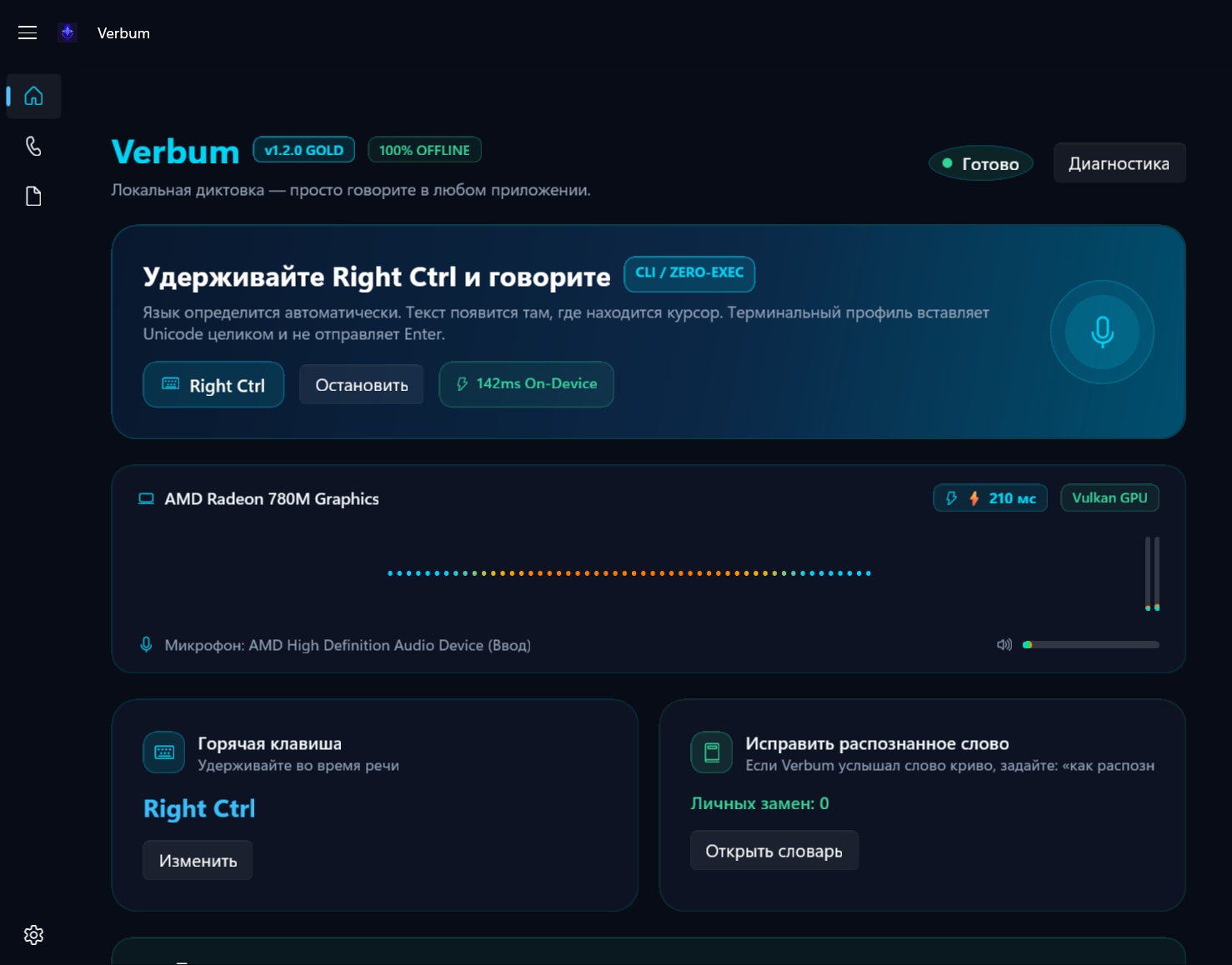
Verbum — локальная система голосовой диктовки для Windows 11. Надиктовывайте промпты в AI-агенты (Claude Code, Cursor, Windsurf), пишите комментарии, коммиты и документацию голосом — на естественном русском языке со встроенными английскими терминами, названиями библиотек и флагами без ручного переключения раскладки клавиатуры.
Verbum is a local-first voice dictation tool for Windows 11. Dictate in Russian without ever switching layouts for English identifiers, CLI flags, or library names — Verbum handles the technical mix natively.
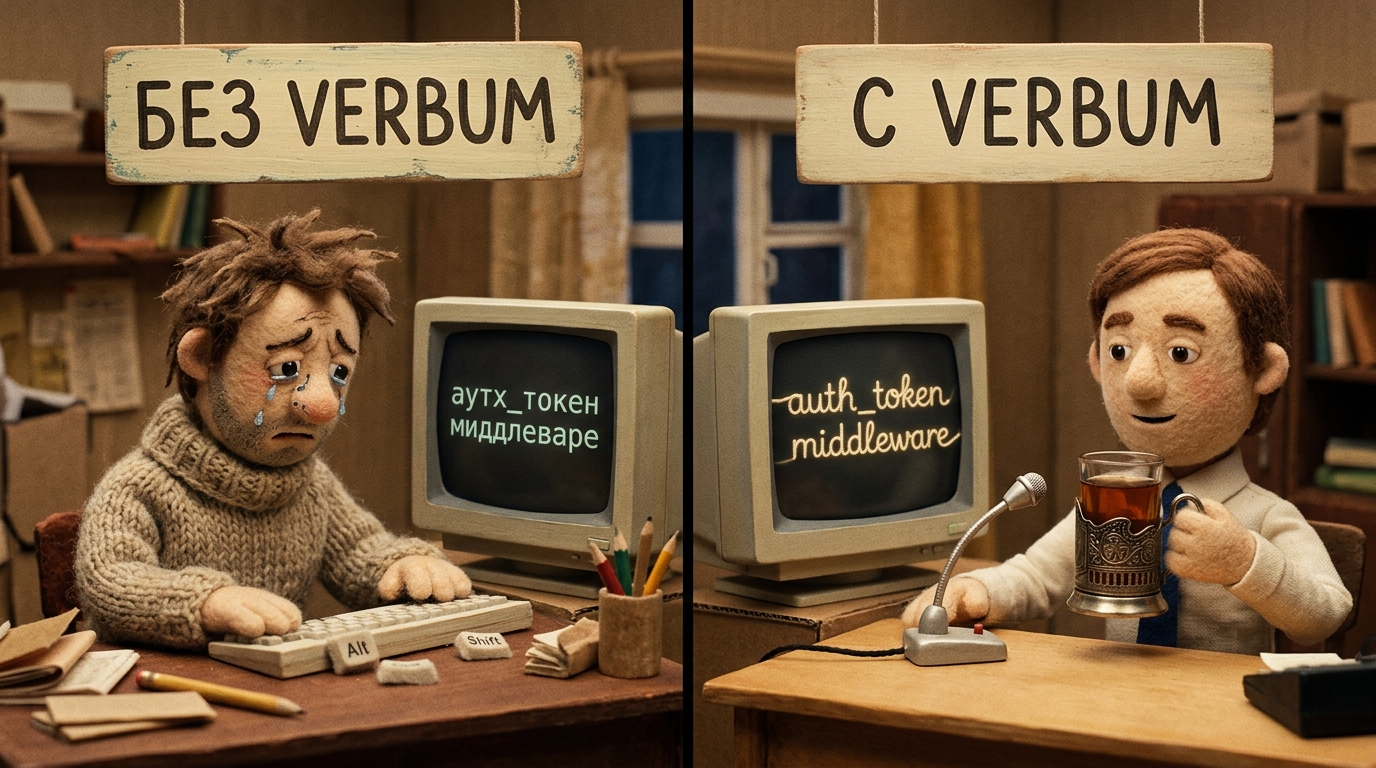
Почему обычный голосовой ввод бесит разработчиков.Why standard voice tools fail developers.
Переключение раскладкиConstant Layout Switching
Каждое английское слово в русском предложении («добавь auth_token в headers») заставляет переключать раскладку или выдает «аутх_токен». Verbum понимает смешанную речь на лету.
Mixing English identifiers into Russian speech breaks standard speech engines. Verbum recognizes mixed technical terminology natively on the fly.
Случайный Enter в терминалеAccidental Enter in Shells
Обычные утилиты могут отправить перевод строки посреди незаконченной команды rm -rf /var/data или git push. Verbum применяет safeguards для ввода в терминале и оставляет текст черновиком.
Standard voice tools may inject newlines into partial shell commands like git push --force. Verbum applies terminal input safeguards and leaves the text for manual review.
Облачный лаг и приватностьCloud Lag & Leakage
Облачные API зависят от сети и отправляют данные на удалённую инфраструктуру. Verbum работает локально; фактическая скорость зависит от модели, железа и длины фразы.
Cloud APIs depend on network and service conditions and send data to remote infrastructure. Verbum runs locally; actual timing depends on the model, hardware, and utterance length.
Непрерывное SFT-дообучение и синхронный стриминг-перевод. Continuous SFT Adaptation & Instant Streaming Translation.
В версии 2.0 Verbum перерос обычный движок диктовки. Теперь это производительная локальная система на базе faster-whisper с потоковым переводом и аппаратными акустическими ловушками тишины.
In version 2.0, Verbum transcends standard voice dictation. Powered by faster-whisper and hardware-optimized inference, it delivers real-time streaming translation and acoustic silence traps.
Joules + Unsloth SFT Engine Joules + Unsloth SFT Engine
Непрерывное локальное дообучение модели на ваших кодовых базах, документации и рабочих логах. Verbum мгновенно запоминает внутренние имена сервисов, специфический сленг вашей команды и редкие библиотеки.
Continuous local model adaptation on your codebases, logs, and technical notes. Verbum natively learns your internal microservice names, team jargon, and obscure library syntax with zero cloud round-trips.
Потоковый Перевод в Реальном Времени Real-Time Streaming Translation
Мгновенный перевод живой речи с немецкого и английского на русский на лету. Архитектура спекулятивного префиксного стриминга (Wait-k) с непрерывным потоковым выводом токенов без ожидания конца длинной фразы.
True speech translation from German and English to Russian on the fly. Speculative prefix streaming (Wait-k policy) running directly on local hardware with continuous streaming output without waiting for full sentences.
Защита от артефактов тишины Silence Artifact Guard
Акустические ловушки и шлюз подавления циклических повторений помогают снижать типичные артефакты Whisper, например «Спасибо за просмотр» или зацикленные фразы во время вздохов, пауз и фонового шума.
Acoustic silence traps and an anti-repetition gate help reduce typical Whisper artifacts such as "Thank you for watching" or loop cascades during breaths, pauses, and ambient office noise.
Картриджи Просодии Micro-SLM v2 Micro-SLM Prosody Cartridges v2
Автономные легковесные картриджи для интонационной расстановки знаков препинания, вопросительных знаков и кавычек с небольшим локальным оверхедом без обращения к тяжёлым внешним LLM; фактическое время зависит от модели и железа.
Hot-swappable micro-SLM cartridges add lightweight on-device punctuation and syntax processing without calling heavy cloud LLMs; actual overhead depends on the model and hardware.
Создан для непрерывного потока разработки.Built for technical flow state.
Обычная диктовка ломается в редакторах кода: переводит названия функций, коверкает английские термины и случайно нажимает Enter в консоли. Verbum решает это на уровне локальной архитектуры.
Standard voice typing fails in code editors because it translates code names, garbles technical English, and triggers accidental commands. Verbum solves this with a purpose-built local architecture.
Два Режима РаспознаванияDual-Mode Inference
Fast (Быстрый): лёгкая модель для коротких промптов в AI-агенты; фактический отклик зависит от модели, железа и фразы.
Accurate (Точный): модель large-v3-turbo-q5_0 с confidence rescue и расстановкой пунктуации для сложных технических текстов.
Fast Mode: optimized models for rapid agent prompts; actual single-pass timing varies with model, hardware, and utterance.
Accurate Mode: large-v3-turbo-q5_0 with confidence rescue and spoken punctuation for long-form engineering dictation.
Zero-Execution: Защита ТерминалаZero-Execution Terminal Safety
Никаких случайных запусков команд. Verbum строго блокирует отправку Enter, Tab и управляющих символов в терминалы (Windows Terminal, PowerShell, WSL, Claude CLI, Codex). Текст вставляется как черновик.
Never auto-submits dangerous commands. Verbum strictly suppresses Enter, Tab, and control characters in terminal targets (Windows Terminal, PowerShell, WSL, Claude CLI, Codex).
Без Смены РаскладкиZero Layout Switching
Говорите по-русски, свободно используя английские идентификаторы, camelCase, snake_case, флаги CLI (--force) и немецкие термины. Автоматическое определение языка без ручных переключателей.
Speak Russian sentences with mixed English identifiers, camelCase, snake_case, CLI flags (--check), and German terms. Automatic language detection without manual hotkey toggling.
100% Локально и Приватно100% Offline & Private
Работает на базе C++ движка whisper.cpp с Vulkan GPU-ускорением (AMD Radeon, NVIDIA RTX, Intel Arc) и автоматическим fallback на CPU. Никакой отправки голоса в облако, ноль телеметрии.
Powered by local whisper.cpp with Vulkan GPU acceleration (AMD Radeon, NVIDIA RTX, Intel Arc) with automatic CPU fallback. Zero audio streaming, zero telemetry, zero mandatory cloud accounts.
Защита Буфера ОбменаSafe Clipboard Preservation
Интеллектуальный снимок и восстановление текста, HTML, битмапов (DIB) и файлов (HDROP). История вашего буфера обмена не повреждается и не затирается при голосовой вставке.
Full-format snapshot and restoration for text, rich HTML, DIB bitmaps, and HDROP file paths. Your active clipboard history remains completely untouched during voice injection.
Пакеты Терминов (.vpack)Terminology Packs (.vpack)
Строгая иерархия подстановки: Личный словарь > Криптографически подписанные пакеты .vpack > Базовый глоссарий. Точная канонизация сленга («докер компоуз» → «docker compose»).
Strict resolution hierarchy: Personal Dictionary > Cryptographically Signed .vpack Archives > Core Glossaries. Custom domain dictionaries for IT, backend, devops, and science.
Запись Созвонов (Zoom / Teams) [Beta]Meeting Transcriber (Zoom / Teams) [Beta]
Двухканальный захват звука (WASAPI loopback + микрофон). Записывает ваш голос и собеседников из Zoom, Teams или Meet, разделяет спикеров и формирует Markdown-конспект с таймкодами. Плюс плавающее окно Live Captions.
Dual-channel capture (WASAPI loopback + microphone). Records you and remote speakers from Zoom, Teams, or Meet, diarizes speakers, and outputs timestamped Markdown notes with real-time Live Captions.
Голосовые Макросы (camelCase & snake_case)Natural Developer Voice Macros
Диктуйте код естественно: скажите «в кэмел кейсе юзер айди» ➔ userId, «в снейк кейсе респонс статус» ➔ response_status, «в кебаб кейсе аус токен» ➔ auth-token.
Speak code naturally: say "in camel case user id" ➔ userId, "in snake case response status" ➔ response_status, "in kebab case auth token" ➔ auth-token.
1-Keystroke Undo (Мгновенный Откат)1-Keystroke Undo & Rollback
Нажмите Right Alt + Backspace сразу после вставки — Verbum мгновенно сотрет надиктованный текст и восстановит исходное состояние буфера обмена.
Press Right Alt + Backspace after injection — Verbum immediately deletes the inserted text and restores your prior clipboard state.
Плавающий Glassmorphic HUDFloating Glassmorphic HUD
Ультра-легкая демонстрационная капсула в стиле Windows 11 Mica Alt: звуковая волна, бейджи целевых профилей ([CLI], [CODE], [DATEV]) и пример отображения времени; реальные значения зависят от модели и железа.
Illustrative Windows 11 Mica Alt floating capsule: audio waveform, dynamic profile badges ([CLI], [CODE], [DATEV]), and a sample timing HUD; actual values depend on model and hardware.
4x-Speed & Локальная Очистка Речи4x-Speed & On-Device Prose Cleaner
Специализированная локальная модель для подкастов и длинных войсов. Распознает речь на 4x скорости воспроизведения, автоматически вырезает слова-паразиты («типа», «как бы», «эээ», «you know»), схлопывает заикания и размечает реплики по ролям ([Ведущий] / [Гость]) полностью оффлайн.
Curriculum-distilled local model for podcasts and voice notes. Transcribes speech at 4x playback speed, automatically removes spoken disfluencies ("um", "like", "you know"), fixes stutters, and attributes speaker roles ([Host] / [Guest]) completely offline.
Конспекты созвонов без облачных ботов.Meeting notes with zero cloud bots.
Не нужно пускать сторонних ботов в конфиденциальные звонки. Verbum захватывает системный звук Windows и микрофон прямо на вашем ПК, разделяет речь участников и сохраняет готовый структурированный конспект.
No need to invite untrusted cloud bots into private client meetings. Verbum captures system loopback audio and your microphone locally, separating speakers into structured Markdown notes.

Почему разработчики выбирают Verbum.How Verbum compares.
Наглядное сравнение с облачными API и стандартными системными утилитами.
Why developers replace cloud voice APIs and standard OS voice typing with Verbum.
| Функция / ХарактеристикаFeature / Capability | Verbum v2.0.0 | Cloud Whisper API | Windows Voice (Win+H) | macOS Dictation |
|---|---|---|---|---|
| 100% Локально и Оффлайн100% Local & Offline | ✓ Да (Vulkan GPU)Yes (Vulkan GPU) | ✗ Облачный стримингCloud Streamed | ✗ Облако MicrosoftMicrosoft Cloud | ~ ЧастичноMixed |
| SFT-дообучение под стек (Joules + Unsloth)Continuous SFT Adaptation | ✓ Локальное SFTLocal SFT & LoRA | ✗ НетNone | ✗ НетNone | ✗ НетNone |
| Синхронный стриминг-перевод (Real-Time)Real-Time Streaming Translation | ✓ Wait-k CPU стримингWait-k CPU Streaming | ✗ Зависит от сети и сервисаNetwork and service dependent | ✗ НетNone | ✗ НетNone |
| Защита от артефактов тишиныSilence Artifact Guard | ✓ 100% акустические ловушкиAcoustic Traps | ✗ Артефакты на тишине возможныSilence artifacts possible | ✗ Обрывает диктовкуDrops dictation | ✗ ОшибаетсяErrors |
| Без смены раскладки (RU + EN Код)Zero Layout Switching (RU + EN) | ✓ Нативный миксNative Multi-Vocab | ~ НестабильноInconsistent | ✗ Только 1 языкSingle Language | ✗ Только 1 языкSingle Language |
| Защита от случайного Enter в терминалеTerminal Zero-Execution Guard | ✓ Защита ввода в терминалеTerminal Input Safeguards | ✗ НетNo Guard | ✗ Может нажать EnterMay submit Enter | ✗ НетNo Guard |
| Сохранение буфера обмена (картинки, файлы)Safe Clipboard Snapshot/Restore | ✓ Полный снимокText + Bitmaps + Files | ~ Зависит от клиентаClient-dependent | ✗ N/A | ✗ N/A |
| Пакеты терминов (.vpack) и глоссарииDomain Packs (.vpack) | ✓ Подписанные архивыSigned Packs | ✗ НетNone | ✗ НетNone | ✗ НетNone |
| Задержка (Push-to-Talk)Latency (Push-to-Talk) | ✓ Зависит от модели, железа и фразыModel, hardware & utterance dependent | ✗ Зависит от сети и сервисаNetwork and service dependent | ~ Зависит от системыSystem dependent | ~ Зависит от системыSystem dependent |
| Стоимость / ПодпискаSubscription / Cost | ✓ Бесплатно / Локально100% Free / Local | ✗ $0.006/мин + подписка$0.006/min + subscription | ✓ ВстроеноIncluded | ✓ ВстроеноIncluded |
Требования к оборудованию.System requirements.
Verbum скомпилирован нативно под 64-битную архитектуру Windows с поддержкой современного аппаратного ускорения.
Verbum is compiled natively for Windows 64-bit architecture with modern hardware acceleration.
Операционная СистемаOperating System
Windows 11 (рекомендуется 22H2 или новее) или Windows 10 x64 (сборка 19041+). Нативный интерфейс WinUI 3 с поддержкой материалов Mica.
Windows 11 (22H2 or newer recommended) or Windows 10 x64 (build 19041+). Native WinUI 3 desktop shell with Mica material support.
GPU УскорениеGPU Acceleration
Рекомендуется: AMD Radeon (780M / RDNA2 / RDNA3+), NVIDIA GeForce (RTX / GTX 10-серия+), Intel Arc с поддержкой Vulkan 1.3.
CPU Fallback: Включен оптимизированный многопоточный AVX2 / AVX-512 CPU бэкенд.
Recommended: AMD Radeon (780M / RDNA2 / RDNA3+), NVIDIA GeForce (RTX / GTX 10-series+), Intel Arc with Vulkan 1.3 support.
CPU Fallback: AVX2 / AVX-512 multi-threaded CPU backend included.
Память и ДискMemory & Storage
RAM: 8 ГБ минимум (16 ГБ рекомендуется для Turbo модели).
Диск: 2.5 ГБ свободного места для встроенных моделей Whisper и бинарников.
RAM: 8 GB minimum (16 GB recommended for Turbo model).
Disk Space: 2.5 GB free space for bundled models and runtime binaries.
Готов к работе за 60 секунд.Ready in 60 seconds.
Никаких консольных скриптов, настроек окружения или установки Python. Все упаковано в один автономный инсталлятор.
No environment setup, manual Python venvs, or dependencies. Everything is bundled into a single standalone installer.
1. Установите1. Install
Скачайте и запустите Verbum-Setup-2.0.0.exe. Установка занимает меньше минуты в локальный профиль.
Download and run Verbum-Setup-2.0.0.exe. Clean local install in under a minute.
2. Зажмите хоткей2. Hold Hotkey
По умолчанию зажмите Правый Alt (Push-to-Talk) и начните говорить в любом приложении.
Hold Right Alt (Push-to-Talk default) and speak naturally in any target window.
3. Готово!3. Done!
Отпустите клавишу — распознанный текст со всеми английскими терминами мгновенно напечатается в окно.
Release the key — clean formatted text with technical identifiers is inserted into your active app.
Скачать Verbum v2.0.0Download Verbum v2.0.0
Автономный чистый инсталлятор Inno Setup. Включает оффлайн-модели STT, движок Vulkan GPU и графическое приложение.
Standalone, clean Inno Setup installer. Bundled with complete offline STT models, Vulkan GPU engine, and desktop app.
Скачать Verbum-Setup-2.0.0.exe Download Verbum-Setup-2.0.0.exeGet-FileHash Verbum-Setup-2.0.0.exe -Algorithm SHA256
Часто задаваемые вопросы.Frequently asked questions.
Right Ctrl, Ctrl+Shift+Space, CapsLock и любые кастомные глобальные хуки.
Verbum supports both Push-to-Talk (hold key while speaking) and Toggle (press to start, press to stop) modes. Presets include Right Alt, Right Ctrl, Ctrl+Shift+Space, CapsLock, and custom Win32 low-level key bindings with modifier suppression.